LINE

Help center

  • ENGLISH
  • Tiếng Việt
  • iOS
  • Android

Search Help articles

    GET IT is the app that assists you in finding local services, useful products and interesting places around you. Based on your location, GET IT will suggest the information you need. 
    We help you to:
    - Find quality products
    - Explore nearby stores 
    - Update the latest information
    - Advertise your local business

    Was this page helpful?

    Thank you for your feedback.

    Let us know if we can make it better.

    Note:
    - Do not enter any personal information.
    - We cannot respond to comments received from this form.

    Sorry about that. What went wrong?

    Note:
    - Do not enter any personal information.
    - We cannot respond to comments received from this form.
    Listing on GET IT is simple and free.


    Step 1 Tap on the 'Sell' button in the app

    Step 2 Take a new photo or upload an existing photos of the item you wish to sell. You can upload up to 15 photos, and more than one at a time

    Step 3 Take a minute to give your listing a price, category, title, etc. 

    Step 4 When you are done, tap on 'Upload' button


    Once you upload, the listing will be automatically sent to our admin team for review. If the listing has no issue, it will be posted on GET IT. If the listing violates our policies and guidelines, the listing will be rejected. 

    Was this page helpful?

    Thank you for your feedback.

    Let us know if we can make it better.

    Note:
    - Do not enter any personal information.
    - We cannot respond to comments received from this form.

    Sorry about that. What went wrong?

    Note:
    - Do not enter any personal information.
    - We cannot respond to comments received from this form.
    Case 1: Banned or restricted sale item
    - GET IT does not allow the sale of products / services on the prohibited list. Check out List of Prohibited and Conditional Business in “Help center”.

    Case 2: Inappropriate content
    - Listings with sensitive or ​abusive, Insulting or similarly harmful contents are not allowed
    - Listings with empty, unclear, or incomplete content are not allowed.
    - Contents irrelevant to the item are not allowed.
    - Listings without basic information about the product/service are not allowed.
    - An appropriate listing needs full information about:
    Condition: New/ Used (If used, please describe the current condition of the product clearly whether the item is scratched or not.)

    Manufacturer, model, accessories, or warranty (if any) (especially for electronics, household appliances, and vehicles)- Size, material, and brand (especially for clothing and accessories)

    Area, address and ownership status (for real estate).

    - ‘Need to buy’ articles are allowed to be posted only in Vehicles, Real Estate, Class &Tutoring, Recruitment categories.

    Case 3: Duplicated listing
    - Listings with duplicate content are not allowed.
    - If multiple listings contain the same content, only one listing will be approved.
    * Tips: You can use the feature "Push to the top" to reach more buyers.

    Case 4: Unreasonable price
    - If the price of the item is much higher or much lower than the market price, the listing will be rejected. The seller then needs to adjust the price before reposting.
    - Blank price is only allowed in Real Estate, Vehicles, Class &  Tutoring, Recruitment categories).

    Case 5: Suspected Ads / Spam
    - Null articles, content or images that are not related to the sale products, are not allowed.

    Case 6: Misleading product information
    - Product information in the description (including product name, brand, price, product status) should be consistent with the information on the image and the price of the product.
    - Listings with different prices in the ‘Price’ box, on the photos (if any) and in the description are not allowed.
    If there are many products with different prices in the same listing, input the price of one of the products in the 'Price' box, and note the price of each product on the photos or in the description respectively.

    Case 7: Inapplicable currency
    - Only Vietnamese Dong (VND) is allowed.

    Case 8: Multiple items with different prices
    - Different types of products belong to different categories, with different prices can't be posted in one listing. Please separate them into different posts. 
    - Different types of products belong to one category with the same price are allowed. Please clearly note that the listing offers a same-price discount in the description.

    Case 9: Only using images from the Internet
    - The post must contain at least one real photo of the product, it will be rejected if only images from the Internet are used and no actual image of the product is available.
    - Do not use screenshots in the photo gallery.
    * Tips: You can use images from the Internet; however, there must be at least 1 real photo of the product.

    Case 10: Containing external contact information
    - Articles with website address, phone number, or store location information are not allowed.
    - Photos with store logos are allowed; however, the logo cannot contain website address, phone number, and store location.

    Case 11: Unclear images
    - Images should be taken in bright places and show the product clearly.
    - Images that are over-edited, blurry, unclear, or misleading about the real condition of the product will be rejected.
    - Images that are too small or not fully visible will also be rejected.
    - Images containing Facebook/Instagram /Zalo, website address or phone number will be rejected
    - For smartphones, the images should capture all the sides and angles to help the buyers identify the quality of the product easier.
    * Tips: Buyers want to see real images of the product before buying. Post clear, attractive images and at least 5-6 real photos of the product to sell faster.

    Case 12: Offensive images
    - Offensive images, monetary images (including all currencies of all countries) or photos containing pornographic content are prohibited.

    If you have any concerns or believe your post has been mistakenly rejected, please click on 'Inquire about this listing' or send an email to support@get-it.me for assistance.

    Was this page helpful?

    Thank you for your feedback.

    Let us know if we can make it better.

    Note:
    - Do not enter any personal information.
    - We cannot respond to comments received from this form.

    Sorry about that. What went wrong?

    Note:
    - Do not enter any personal information.
    - We cannot respond to comments received from this form.

    A. Products

    1. List of prohibited items

    1. Adult items
    2. Antennas and satellite dishes 
    3. Aquatic products which are prohibited from use/ containing toxic chemicals in excess of the permissible limits or life-endangering natural toxins. 
    4. Beer, assorted liquors and other stimulants 
    5. Breast milk and used baby products including milk bottles, napkins, pacifiers, milk coolers, milk warmers, milk for children under 24 months, nutritional products for children under 6 months old 
    6. Catalytic converter and test pipes
    7. Cell phone numbers
    8. Chemicals listed in Tables 1, 2 and 3 of the Convention on the Prohibition of the Development, Production, Stockpiling and Use of Chemical Weapons
    9. Cigarettes, cigars and other finished tobacco products
    10. Counterfeit goods, smuggled goods, imitated goods and piracy goods
    11. Cultural products that are reactionary, depraved, superstitious or harmful to aesthetic education, personality
    12. Dangerous toys and toys harmful to the personality education and health of children or to security, social order and safety (including video game programs)
    13. Drugs, pre-substances, narcotic drugs, psychotropic and drug paraphernalia 
    14. Email address
    15. Embargoed goods
    16. Fertilizers on the list of fertilizers prohibited to be used in Vietnam, expired fertilizers, fertilizers not meeting the requirements of National Technical Regulations 
    17. Firearms, weapons and army knives, hunting rifles and bullets of hunting rifles, sport weapons, support devices 
    18. Firecrackers
    19. Food additives, food processing supports being expired, in excess of the permitted limits or not yet permitted to be traded 
    20. Goods containing images of marijuana, flowers poppy
    21. Goods containing radioactive substances, radiation emitters or radioactive sources
    22. Human remains and body parts 
    23. IDs and license and Government Document 
    24. Imported scrap causing environmental pollution
    25. Mailing lists and personal information 
    26. Materials that are hazardous, restricted, or regulated by law
    27. Medical and pharmaceutical products not yet permitted to be used in Vietnam
    28. Lock picking devices
    29. Pharmaceuticals and herbs not yet permitted to be used in Vietnam
    30. Plants, endangered animals, and rare animals
    31. Police-related items 
    32. Precious and rare wild plant and animal species, including also live plants and animals and their processed parts
    33. Prescription drugs
    34. Products and materials containing amiang in the amphibole group
    35. Propagation materials not on the list of plant/animal breeding varieties permitted to be traded
    36. Recalled items 
    37. Slot machines
    38. Specially toxic minerals
    39. Stolen property 
    40. Used clothing that is not clean and has stains, used underwear
    41. Used contact lenses and glasses
    42. Used cosmetics
    43. Veterinary medicine and plant protection drugs which are prohibited or not yet permitted to be used in Vietnam


    2. List of conditional items 

    a) Conditional items which require certificate of satisfaction of business conditions 
    1. All types of gas (including extraction) 
    2. Chance listings (i.e. Lottery) 
    3. Civil cryptographic products 
    4. Cyberinformation security products 
    5. Duty free goods 
    6. Electricity 
    7. Films, tapes and disks 
    8. Gasoline, oil of all kinds 
    9. Medicine for people and materials of medicine for people 
    10. Tobacco materials, tobacco, specialized machinery and equipment for tobacco manufacture 
    11. Veterinary and plant protection drugs and materials for manufacturing of veterinary and plant protection drugs (except those which are prohibited or not yet permitted to be used in Vietnam) 

    b) Conditional items which do not require certificate of satisfaction of business conditions 
    1. All types of fireworks excluding firecrackers 
    2. Animal feed
    3. Antiques, precious objects and national treasures (including artifacts, cultural heritage, and grave-related items) 
    4. Aquatic feed 
    5. Audio and video recordings of art performances (including radio recordings, TV recordings and Internet recordings) 
    6. Bio-products for waste treatment 
    7. Camouflage equipment, software used for recording, video recording and positioning 
    8. Cell phone jamming devices 
    9. Chemicals excluding chemicals prohibited to be traded under the Convention on the Prohibition of the Development, Production, Stockpiling and Use of Chemical Weapons 
    10. Coal 
    11. Credit and debit cards 
    12. Explosive precursors, industrial explosives 
    13. Fertilizer 
    14. Fishing gears (including raw materials for fishing gear) and fishing equipment
    15. Food 
    16. Genetically modified products 
    17. Gold bars
    18. Insecticidal or germicidal chemicals and preparations for household and medical use 
    19. Machines, equipment, supplies and substances subject to strict requirements on labor safety and labor hygiene
    20. Medical devices and equipment 
    21. Military equipment and supplies for the people's armed forces, military weapons, technical equipment, ammunition and specialized vehicles used for the army and the police; components, accessories, spare parts and specialized equipment and technology used for their production 
    22. Paintball guns 
    23. Propagation materials (plant/animal/aquatic product breeding varieties) permitted to be traded 
    24. Radio transmitters and receivers 
    25. Stamps, currency and coins
    26. Stocks and other securities 
    27. Support devices (as guns with rubber bullets, tear gas, flares, batons, shields, bulletproof helmets etc) 
    28. Telecommunications equipment
    29. The signaling device of the vehicle shall be given priority 
    30. White amiang in serpentine group 


    B. Services

    Services are not allowed to be promoted or distributed on GET IT. 

    Was this page helpful?

    Thank you for your feedback.

    Let us know if we can make it better.

    Note:
    - Do not enter any personal information.
    - We cannot respond to comments received from this form.

    Sorry about that. What went wrong?

    Note:
    - Do not enter any personal information.
    - We cannot respond to comments received from this form.

    When your listing is rejected, first you need to check the rejection reason in the following ways:
    1. Check the notification center 
    2. Go to My - Review - Rejected and check the details

    Then you should carefully review your listing accordingly. Once you've checked the reason, you can edit the listing by:
    Step 1 Tap on the rejected listing you wish to edit
    Step 2 Tap on the '...' icon on the top right corner
    Step 2 Tap on the ‘Edit and repost’ button and confirm 

    Your listing will be reviewed again. If the listing does not violate our terms and conditions, it will be approved. 

    If you believe your listing has been mistakenly rejected, please contact us via support@get-it.me for further assistance.

    Was this page helpful?

    Thank you for your feedback.

    Let us know if we can make it better.

    Note:
    - Do not enter any personal information.
    - We cannot respond to comments received from this form.

    Sorry about that. What went wrong?

    Note:
    - Do not enter any personal information.
    - We cannot respond to comments received from this form.

    If you want to make adjustments to your listing:
    Step 1 Tap the ‘...’ icon on the listing you want to edit
    Step 2 Tap on ‘Edit listing’
    Step 3 When you are done editing, tap on ‘Done’ button

    The listing will be reviewed again. If the listing has no issue, it will be re-posted.

    Was this page helpful?

    Thank you for your feedback.

    Let us know if we can make it better.

    Note:
    - Do not enter any personal information.
    - We cannot respond to comments received from this form.

    Sorry about that. What went wrong?

    Note:
    - Do not enter any personal information.
    - We cannot respond to comments received from this form.

    To delete a listing you've posted:

    Step 1 Go to 'My'

    Step 2 Go to 'For Sale'

    Step 3 Tap on the 'Delete' button and confirm


    Was this page helpful?

    Thank you for your feedback.

    Let us know if we can make it better.

    Note:
    - Do not enter any personal information.
    - We cannot respond to comments received from this form.

    Sorry about that. What went wrong?

    Note:
    - Do not enter any personal information.
    - We cannot respond to comments received from this form.

    Step 1 Go to 'For Sale’
    Step 2 Tap on ‘Push to Top’ on the listing you want to push 
    or
    Step 1 Go on your listing’s detail page
    Step 2 Tap on the '...' icon in the top right corner of the screen 
    Step 3 Tap on 'Push to top' and confirm

    Your listing will be pushed to the top of feeds immediately without being reviewed again.

    Was this page helpful?

    Thank you for your feedback.

    Let us know if we can make it better.

    Note:
    - Do not enter any personal information.
    - We cannot respond to comments received from this form.

    Sorry about that. What went wrong?

    Note:
    - Do not enter any personal information.
    - We cannot respond to comments received from this form.

    To change the listing availability to On Hold:

    Step 1 Go to 'My'

    Step 2 Go to 'For Sale'

    Step 3 Tap on 'Change to On Hold' button and confirm 


    To change the listing availability to On Sale:

    Step 1 Go to 'My'

    Step 2 Go to 'For Sale'

    Step 3 Tap on 'Remove On Hold' button and confirm

    Was this page helpful?

    Thank you for your feedback.

    Let us know if we can make it better.

    Note:
    - Do not enter any personal information.
    - We cannot respond to comments received from this form.

    Sorry about that. What went wrong?

    Note:
    - Do not enter any personal information.
    - We cannot respond to comments received from this form.

    The location of your listing is always displayed by District, not an exact address. 
    Your personal address will not be published. 

    Was this page helpful?

    Thank you for your feedback.

    Let us know if we can make it better.

    Note:
    - Do not enter any personal information.
    - We cannot respond to comments received from this form.

    Sorry about that. What went wrong?

    Note:
    - Do not enter any personal information.
    - We cannot respond to comments received from this form.

    When you want to buy items on GET IT, you can contact the seller by:
    - Call: Directly call the seller
    - SMS: Send text messages to the seller
    - Chat: Directly chat with the seller via GET IT app

    Was this page helpful?

    Thank you for your feedback.

    Let us know if we can make it better.

    Note:
    - Do not enter any personal information.
    - We cannot respond to comments received from this form.

    Sorry about that. What went wrong?

    Note:
    - Do not enter any personal information.
    - We cannot respond to comments received from this form.

    In-app payment is currently not supported on GET IT. You can contact the seller directly to decide a payment method. 

    Was this page helpful?

    Thank you for your feedback.

    Let us know if we can make it better.

    Note:
    - Do not enter any personal information.
    - We cannot respond to comments received from this form.

    Sorry about that. What went wrong?

    Note:
    - Do not enter any personal information.
    - We cannot respond to comments received from this form.

    Delivery is currently not supported on GET IT. You can contact the seller directly to decide on a delivery method.

    Was this page helpful?

    Thank you for your feedback.

    Let us know if we can make it better.

    Note:
    - Do not enter any personal information.
    - We cannot respond to comments received from this form.

    Sorry about that. What went wrong?

    Note:
    - Do not enter any personal information.
    - We cannot respond to comments received from this form.

    Our system may have blocked your account for a variety of reasons, including but not limited:

    - Posting items that are on the prohibited items list

    - Not following the Rules of Use that are mentioned in our Terms of Service


    If you believe you have been mistakenly blocked, please contact us via support@get-it.me so we can review your account and take appropriate action.

    Was this page helpful?

    Thank you for your feedback.

    Let us know if we can make it better.

    Note:
    - Do not enter any personal information.
    - We cannot respond to comments received from this form.

    Sorry about that. What went wrong?

    Note:
    - Do not enter any personal information.
    - We cannot respond to comments received from this form.

    You can easily change the setting by tapping on your location on the upper left corner of the Home tab. You can choose a preferred area or set your current location using GPS, and adjust the view range at the same time.

    Was this page helpful?

    Thank you for your feedback.

    Let us know if we can make it better.

    Note:
    - Do not enter any personal information.
    - We cannot respond to comments received from this form.

    Sorry about that. What went wrong?

    Note:
    - Do not enter any personal information.
    - We cannot respond to comments received from this form.

    GET IT provides a platform for people to trade goods directly and conveniently in nearby areas. Items around your location will be prioritized on top. 
    If the GPS is enabled, your current location will be automatically displayed on the map at your first location setup. Once you set your location, it will be saved as your default location. 
    *Note: If you do not set your location, the default location will be set to District 1, Ho Chi Minh City.

    Was this page helpful?

    Thank you for your feedback.

    Let us know if we can make it better.

    Note:
    - Do not enter any personal information.
    - We cannot respond to comments received from this form.

    Sorry about that. What went wrong?

    Note:
    - Do not enter any personal information.
    - We cannot respond to comments received from this form.

    Rated by other users, GET IT score measures the attitude and activities of a user while using GET IT. Please show proper attitude through polite communication.

    Was this page helpful?

    Thank you for your feedback.

    Let us know if we can make it better.

    Note:
    - Do not enter any personal information.
    - We cannot respond to comments received from this form.

    Sorry about that. What went wrong?

    Note:
    - Do not enter any personal information.
    - We cannot respond to comments received from this form.

    Membership levels are calculated based on your sales activities in the previous month, to be reviewed and updated monthly. Determined by our screening system, membership levels help ensure users' reliability. From the highest levels, there are Gold and Silver levels.

    Was this page helpful?

    Thank you for your feedback.

    Let us know if we can make it better.

    Note:
    - Do not enter any personal information.
    - We cannot respond to comments received from this form.

    Sorry about that. What went wrong?

    Note:
    - Do not enter any personal information.
    - We cannot respond to comments received from this form.

    You can change your username at any time by:

    Step 1 Go to 'My'

    Step 2 Tap on 'Edit Profile' in the upper right-hand corner

    Step 3 Tap on your current username to edit 

    Step 4 When you are done, tap on 'Done' button to save 

    Was this page helpful?

    Thank you for your feedback.

    Let us know if we can make it better.

    Note:
    - Do not enter any personal information.
    - We cannot respond to comments received from this form.

    Sorry about that. What went wrong?

    Note:
    - Do not enter any personal information.
    - We cannot respond to comments received from this form.

    GET IT is currently provided in English and Vietnamese. If you wish to use GET IT in Vietnamese, you can change the language setting on your device to Vietnamese and the app will adjust accordingly. For languages other than Vietnamese, GET IT app will be displayed in English. 

    Was this page helpful?

    Thank you for your feedback.

    Let us know if we can make it better.

    Note:
    - Do not enter any personal information.
    - We cannot respond to comments received from this form.

    Sorry about that. What went wrong?

    Note:
    - Do not enter any personal information.
    - We cannot respond to comments received from this form.

    You may report a listing that violates our policies at any time.

    Step 1 Go to the listing

    Step 2 Tap the three vertical dots in the upper right corner

    Step 3 Tap the 'Report this post' button

    Step 4 Choose the reason for reporting the listing


    Once submitted, the report will be automatically sent to our admin team who will take further action accordingly.


    Was this page helpful?

    Thank you for your feedback.

    Let us know if we can make it better.

    Note:
    - Do not enter any personal information.
    - We cannot respond to comments received from this form.

    Sorry about that. What went wrong?

    Note:
    - Do not enter any personal information.
    - We cannot respond to comments received from this form.

    You may report a user that violates our policies at any time.
    Step 1 Go to the user's profile
    Step 2 Tap the three dots in the upper right-hand corner
    Step 3 Tap the 'Report this user' button
    Step 4 Choose the reason for reporting the user

    Once submitted, the report will be automatically sent to our admin team who will take further action accordingly.

    Was this page helpful?

    Thank you for your feedback.

    Let us know if we can make it better.

    Note:
    - Do not enter any personal information.
    - We cannot respond to comments received from this form.

    Sorry about that. What went wrong?

    Note:
    - Do not enter any personal information.
    - We cannot respond to comments received from this form.

    To log out of GET IT:

    Step 1 Go to 'My'

    Step 2 Go to 'About GET IT'

    Step 3 Tap the 'Log Out' button at the bottom and confirm


    Was this page helpful?

    Thank you for your feedback.

    Let us know if we can make it better.

    Note:
    - Do not enter any personal information.
    - We cannot respond to comments received from this form.

    Sorry about that. What went wrong?

    Note:
    - Do not enter any personal information.
    - We cannot respond to comments received from this form.

    To delete your account:

    Step 1 Go to 'My'

    Step 2 Go to 'About GET IT'

    Step 3 Tap 'Delete Account' button and confirm


    Note: Uninstalling or deleting the GET IT app will not delete your account

    Was this page helpful?

    Thank you for your feedback.

    Let us know if we can make it better.

    Note:
    - Do not enter any personal information.
    - We cannot respond to comments received from this form.

    Sorry about that. What went wrong?

    Note:
    - Do not enter any personal information.
    - We cannot respond to comments received from this form.

    If you need to submit an inquiry about this issue, please contact us via support@get-it.me. We will try our best to assist you as soon as possible

    Was this page helpful?

    Thank you for your feedback.

    Let us know if we can make it better.

    Note:
    - Do not enter any personal information.
    - We cannot respond to comments received from this form.

    Sorry about that. What went wrong?

    Note:
    - Do not enter any personal information.
    - We cannot respond to comments received from this form.

    MyStore is a feature for business owners who want to:


    - Build brand awareness 

    - Advertise business to potential customers 

    - Attract more nearby customers to visit the store 

    - Earn customer reviews and build credibility among GET IT community

    Was this page helpful?

    Thank you for your feedback.

    Let us know if we can make it better.

    Note:
    - Do not enter any personal information.
    - We cannot respond to comments received from this form.

    Sorry about that. What went wrong?

    Note:
    - Do not enter any personal information.
    - We cannot respond to comments received from this form.

    Register your store to:
    - Build brand awareness for your business
    - Advertise your store and attract new customers
    - Boost your physical store visit
    - Earn honest reviews and credibility among GET IT users.

    Here is the necessary guide for your registration. Make sure you read it carefully!

    1. Store Profile Photo

    - Official logo of your store
    - Official photo of your store like signboard with store name, phone number, address

    2. Store Information

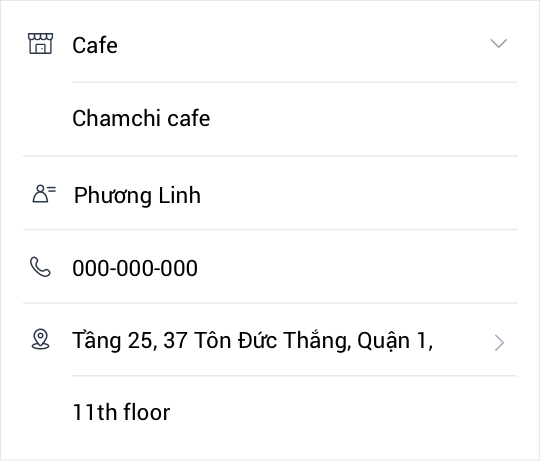
    - Make sure you type the correct and consistent information (owner name, product type, phone number and address).
    GET IT will match all information and confirm your registration
    ​
    3. Document of Proof

    - To confirm your ownership and eligibility of the registered store, GET IT requires supporting documents like 2 sides of your ID card (or Passport, driver license), business license, namecard or signboard. Don't worry - Your identity is always kept confidential.


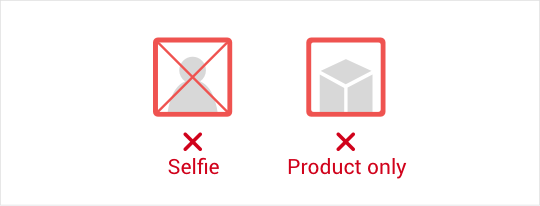
    GET IT will only approve valid documents as required above. If you submit irrelevant photos (selfie, only product's images, etc.), your store will be rejected.


    Was this page helpful?

    Thank you for your feedback.

    Let us know if we can make it better.

    Note:
    - Do not enter any personal information.
    - We cannot respond to comments received from this form.

    Sorry about that. What went wrong?

    Note:
    - Do not enter any personal information.
    - We cannot respond to comments received from this form.

    ​After a store owner issues a coupon, customers can download and redeem the discount directly at the offline store.


    Let's find out how to create and redeem coupons on GET IT 


    1. How to create a coupon (For store owners) 
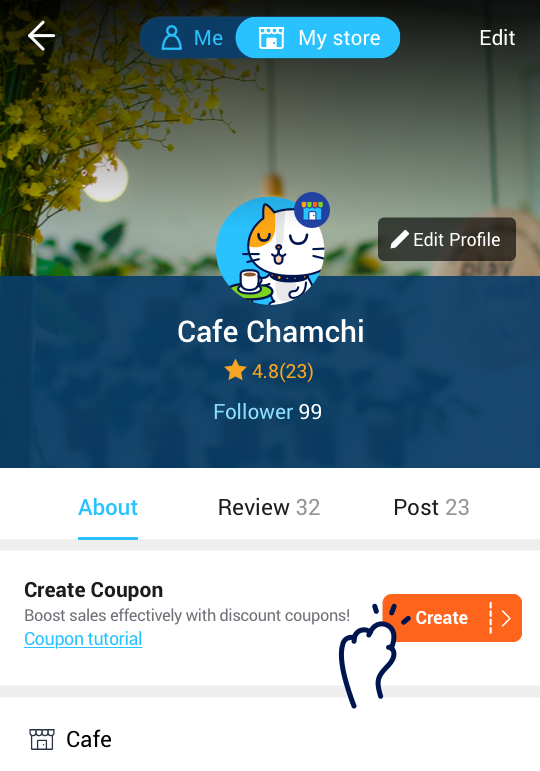


    a. Tap on ‘Create Coupon’ button on your store profile 


    b. Enter the coupon details 

    - Coupons can be issued with a percentage discount or fixed amount discount)


    c. Coupons will be shown on your store profile once coupons are created. 

    - The top two coupons will be shown on your store profile. 

    - You can rearrange the orders to choose which coupons to be shown on your store profile. 


    2. How to redeem a coupon (For customers) 
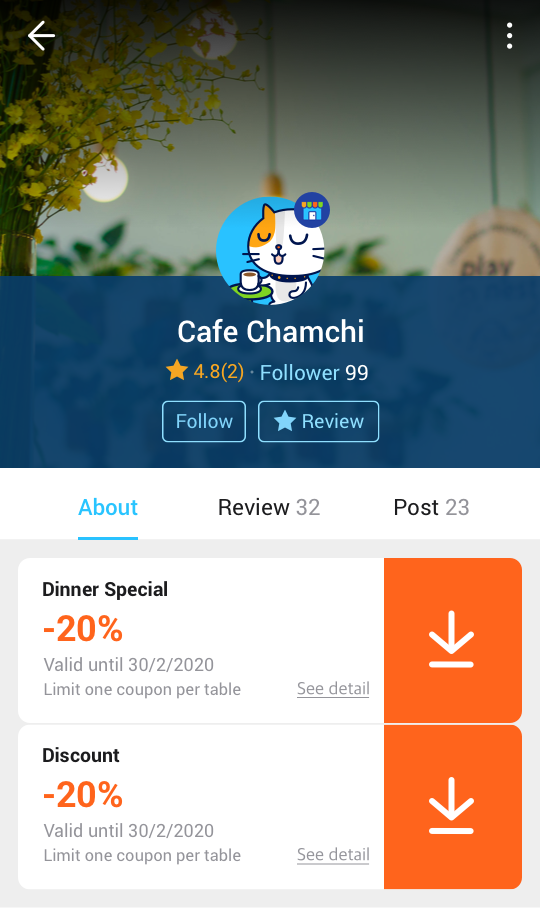


    a. Visit your favorite store’s profile. 
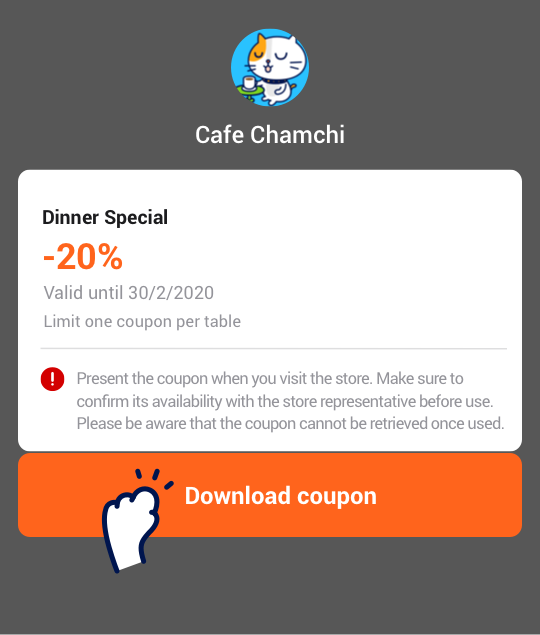


    b. Check the condition of use before downloading a coupon. 
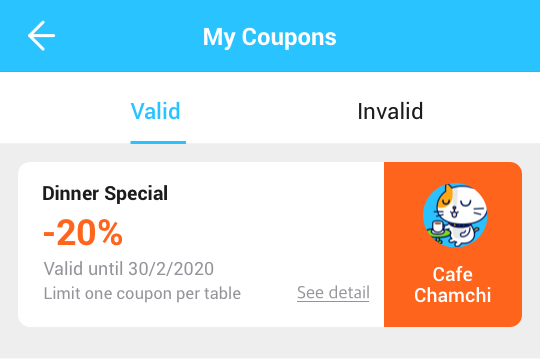


    c. Find downloaded coupons under My Coupons on My Tab. 


    d. Present the coupon to the store, the store representative must check before use. 

    (Make sure the coupon is redeemed by the store representative. One-time use coupons cannot be retrieved once used.)


    Was this page helpful?

    Thank you for your feedback.

    Let us know if we can make it better.

    Note:
    - Do not enter any personal information.
    - We cannot respond to comments received from this form.

    Sorry about that. What went wrong?

    Note:
    - Do not enter any personal information.
    - We cannot respond to comments received from this form.

    Your article may be deleted for the following reasons:
    - Post a sales article in the Community section.
    - Article contains inappropriate images or content.

    If you believe your post has been falsely judged by our admin, please contact GET IT via support@get-it.me for further investigation and assistance.

    Was this page helpful?

    Thank you for your feedback.

    Let us know if we can make it better.

    Note:
    - Do not enter any personal information.
    - We cannot respond to comments received from this form.

    Sorry about that. What went wrong?

    Note:
    - Do not enter any personal information.
    - We cannot respond to comments received from this form.

    If you wish to become a business partner on GET IT, please contact us via support@get-it.me. We look forward to hearing from you soon.

    Was this page helpful?

    Thank you for your feedback.

    Let us know if we can make it better.

    Note:
    - Do not enter any personal information.
    - We cannot respond to comments received from this form.

    Sorry about that. What went wrong?

    Note:
    - Do not enter any personal information.
    - We cannot respond to comments received from this form.

    There are two ways to contact GET IT help center:
    - Send an email to support@get-it.me
    - Call our hotline: 028 36 22 3333
    We will try our best to assist you as soon as possible.

    Was this page helpful?

    Thank you for your feedback.

    Let us know if we can make it better.

    Note:
    - Do not enter any personal information.
    - We cannot respond to comments received from this form.

    Sorry about that. What went wrong?

    Note:
    - Do not enter any personal information.
    - We cannot respond to comments received from this form.

    How to identify scams


    1. Lottery scam

    A deceptive method by sending messages to a group of users via Chat on the application under the name of GET IT to announce that they have won a lot of money or a fantastic prize (motorbike, cash or shopping voucher)


    How to identify:

    The buyer is required to provide personal information and bank account information through an intermediary website.

    The buyer is required to pay a deposit to receive the prize.

    The buyer is required to provide OTP.


    2. Fake bank transfer transaction
    A deceptive method by taking advantage of bank transfer payment via Internet Banking to appropriate assets. After the purchase agreement, the buyer will provide a fake image of a successful transfer transaction to the seller. If the victim does not see the payment credited to his/her account, he/she will be explained that the money will take a while to arrive.
     
    How to identify:
    The buyer constantly urges the seller to deliver the goods asap.
    The buyer constantly makes up reasons to cover for the fact that the money is not credited to the seller’s account.
    The buyer blocks contact immediately after delivery is confirmed.

    3. Fake bank website
    The scammer claims to be overseas and proactively offers advance payment. After the agreement, the victim will receive a payment receipt via SMS but not yet credited to the account; At the same time, the victim is required to click on the link in the message to fill out personal information, provide OTP through a large financial service provider (The current most common form is to fake Western Union) with a belief that the money will be credited after confirming information. When the information is completed, the money will be immediately deducted from the victim's account.
     
    How to identify:
    The buyer claiming to be overseas or a foreigner cannot meet the seller for direct transactions.
    The buyer does not pay by direct transfer but requires payment through an intermediary website/link.
    The buyer constantly forces the seller to fill in personal information and requests OTP.

    How to avoid scams
     
    To prevent the chance of losing money due to frauds, GET IT recommends:
    - DO NOT provide personal information (such as ID card, account number, password, OTP code ...) to strangers.
    - Avoid payment via wire transfer. If a transfer is required, wait for a verification message from the bank before proceeding with delivery.
    - If you have accidentally filled out personal information, and you believe that the other person seems suspicious, immediately log out and do not provide the one-time code (OTP), then contact the bank to lock your account or immediately change the password.
    - DO NOT transfer any fees or deposit money to accounts showing signs of fraud.
    - Be aware of strange websites and accounts impersonating GET IT.

    Note:
    - GET IT does not have any lottery programs or customer appreciation programs at the moment.
    - GET IT does not charge any fee and has only one active official account, which is Chamchi with the logo ‘Official’.

    If you suspect that a buyer/seller is showing signs of fraud, stay calm and follow these steps:
    - Go to that user's profile page, tap the three dots on the top right corner and select ‘Report this user’ with the reason ‘Scam’.
    - Save transaction information (chat history, photos of goods, and etc) and report to CHAMCHI, FB GET IT or email support@get-it.me.

    Was this page helpful?

    Thank you for your feedback.

    Let us know if we can make it better.

    Note:
    - Do not enter any personal information.
    - We cannot respond to comments received from this form.

    Sorry about that. What went wrong?

    Note:
    - Do not enter any personal information.
    - We cannot respond to comments received from this form.

    Get the best deal by haggling with the seller! 
    Our Offer feature allows buyers to start conversations with sellers and negotiate a price privately. If there is an ‘offer’ button next to the price, the seller is willing to take offers. 

    Before making an offer
    - Do not make an offer if you are not actually interested in buying the item.
    - Even if there is an Offer button, it doesn’t mean that you can make a lowball offer. When offering, please be reasonable.
    - Be polite and respect each other.

    Was this page helpful?

    Thank you for your feedback.

    Let us know if we can make it better.

    Note:
    - Do not enter any personal information.
    - We cannot respond to comments received from this form.

    Sorry about that. What went wrong?

    Note:
    - Do not enter any personal information.
    - We cannot respond to comments received from this form.

    Prohibited Businesses 


    - Trade in the narcotic substances 

    - Trade in the chemicals and minerals 

    - Trade in specimens of wild flora and fauna; specimens of rare and/or endangered species of wild fauna and flora 

    - Prostitution; 

    - Human trafficking; trade in human tissues and body parts 

    - Business pertaining to human cloning.


    Conditional Businesses (beside conditional selling items) 

    1. Pawning services 

    2. Massage services 

    3. Lottery business 

    4. Casino business 

    5. Betting business 

    6. Alcohol business 

    7. Sale of tobacco, cigarette, machinery and equipment for tobacco industries 

    8. Sale of foods under the administration of the Ministry of Industry and Trade 

    9. Franchising 

    10. Employment agencies 

    11. Road transport, Air transport, Rail transport, Shipping services 

    12. Automobile maintenance 

    13. Real estate business 

    14. Telecommunications, Postal services 

    15. Education business 

    16. Overseas study consulting services 

    17. Sale of forest animals and plants restricted from use for commercial purposes 

    18. Animal testing and surgery 

    19. Medical treatment and examination 

    20. Vaccination 

    21. Pharmaceutical business 

    22. Sale of foods under the administration of the Ministry of Health 

    23. Karaoke and nightclub business 

    24. Travel services 

    25. Sport business and professional sport clubs 

    26. Accommodation services 

    27. Museum services 

    28. Gold trading


    Full List of Conditional Business 

    Was this page helpful?

    Thank you for your feedback.

    Let us know if we can make it better.

    Note:
    - Do not enter any personal information.
    - We cannot respond to comments received from this form.

    Sorry about that. What went wrong?

    Note:
    - Do not enter any personal information.
    - We cannot respond to comments received from this form.

    Help center

    Copied

    OK